


To end off the week today, I’m going to give you a little tip that you can implement over the weekend (if you like).
We all want traffic. We all want people to stick around on our sites a little longer. In fact, time on site is one of the major ranking factors Google uses to determine your position in SERPs.
As we cover in our mega-guide on SEO, Google is looking at signs of engagement on your posts. And relevant to today’s tip, some of the big ranking factors are:
- Time on site
- Bounce rate (lower the better)
- Scroll depth
Our job when somebody gets to our blog post from Google is to HOOK them. We do this, typically, with:
- The headline
- The meta description
- The feature image
- The hook (first few sentences)
That meta description is what shows up on Google search results. You should most definitely customize how it appears, using an SEO plug-in like Yoast SEO. This is all covered in the SEO guide.
But, what about the post excerpt? Do you really utilize it?
Here’s what I do (and perhaps you noticed it in my recent set of changes to the theme at the Blog Marketing Academy)…
I always custom-write my excerpt. I never leave it to Wordpress. And I write that excerpt to, once again, hook the reader and entice them to read.
Now, typically, people use those excerpts only on blog index pages. Like, when you see latest posts, you might see excerpts there. What I do, though, is display excerpts front and center right on the blog post. Here’s a screenshot from that SEO post…
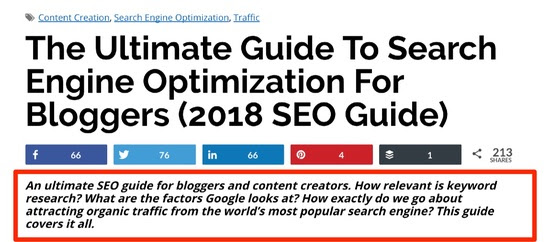
You’ll see the tags at the top. The headline. The social icons. Then… the excerpt.
I make that excerpt larger font, designed to stand out and be read. Basically, I treat it like a sub-headline.
The point? To further hook a new arrival and entice them to begin reading the post.
And note that this excerpt is always custom written. It doesn’t have to be the same as the meta description which appears on Google SERPs. It is a separate function.
So, there you have it. It’s a small, simple tip.
Most bloggers don’t use the excerpt much at all. Some don’t even write it and instead let Wordpress automate it using the first set of words and a little “…” at the end. Some don’t even display it.
But, used right, the simple little excerpt can have an impact. 🙂
– David