


Yesterday, I talked about the fact that there are 2 components to modern SEO:
- On-Google optimization to entice people to click through to your site when they see the result.
- On-site optimization to entice people to stick around when they get there.
Today, I want to talk about #1.
See, you can think of your site in the SERPs (search engine result pages) as a kind of ad. The goal of the ad is the click-through to your site. But, to entice that click, we must tweak the “ad” so that it entices the viewer to convert.
So, what are we talking about in terms of the components of your “ad” in the Google search?
- The headline.
- The URL.
- The description.

Ironically, the description of my own article shown above isn’t right. It simply ends mid-sentence. So, this is an example of what NOT to do. 🙂 Yay.
So, for each of those 3 elements, what you want to do is make them enticing. Make them interesting. SELL them on the post and make them want to click on the darn thing!
How do you do that?
Well, for the headline, you obviously need to put more thought into your blog headlines. Create headlines that will stand out and get people’s attention. Definitely check out my big mega-guide on blog post headlines if you haven’t read it already.
Next up, the URL. Does your URL permalink contain the keyword phrase that they’re searching for? Did you know that you can – and should – be modifying the permalink to optimize it before you publish?

And, your description. By default, it will grab the first bit of text from your article. But, that sucks. So, you nee to override it so that what they see there not only looks complete, but it makes them WANT to click it!
You need to be using some sort of SEO plug-in to enable you to do this stuff. Because, very often you’re going to want to modify the way your article appears in Google even if it is slightly different than that on your blog. For instance, if your headline on the blog is longer than what fits into the title section of Google, you want to modify it specifically for Google so it doesn’t just get cut off.
I recommend Yoast SEO. It’s pretty solid and it will allow you to customize how your post appears to Google.
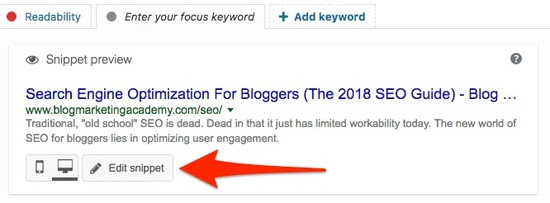
But, as you customize how it looks to Google, think about HUMAN BEINGS. How can you make it clear to real people that your article is going to be a value overload for them? How can you spike their curiosity to make them want to click on it?
Remember, when your site post appears in the SERPs, you’re competing with all the other articles that appear there, too. So, you want to tweak your listing so that it stands out and makes people want to click on YOUR article rather than somebody else’s.
By doing this, you are optimizing your article for search…. by optimizing it for human beings.
That’s a bit of a theme here, isn’t it? 😉
See ya mañana.
– David